Free image to Markdown converter
Drop a screenshot, scan or photo and turn the image to text — clean, copyable Markdown, read by OCR that runs entirely in your browser. Extract the words from any picture and give an AI text it can actually use.
Drop an image to convert
click to browse, or paste a screenshot with Ctrl+V
How to convert an image to Markdown text
- Drop the image into the box above — PNG, JPG, WEBP, GIF, BMP or TIFF. The picture stays on your device; the character recognition runs locally in your browser.
- Press Convert and give it a moment. The first image loads the OCR engine, which takes a few extra seconds; after that, conversions are quick. A progress bar tracks the recognition.
- Download the .md or copy the text into your AI chat — searchable, quotable, editable words instead of a picture the AI has to interpret.
What the converter does with your image
An image is the one format here where the text has to be found before it can be converted. The pipeline gives the OCR engine the best possible shot:
- The image is prepared first — converted to grayscale, contrast-boosted, and upscaled if it's small, so glyphs arrive crisp instead of muddy. If the cleanup ever hurts more than it helps, the original is retried automatically.
- Recognition runs on your device using the Tesseract engine compiled for the browser — the standard open-source OCR that powers countless scanning tools, here without your image going anywhere.
- 35 languages, not just English. A picker appears when you stage an image: Portuguese, German, French, Spanish, and the major Indian languages — Hindi, Tamil, Telugu, Bengali, Marathi, Gujarati, Kannada, Malayalam, Punjabi and Urdu. The right language model is fetched on first use and your choice is remembered for next time. For the scripts that need their own approach there are dedicated pages: Japanese OCR, Chinese OCR and Arabic OCR.
- Tables come back as tables. The OCR engine reports where every word sits, and rows whose words line up in columns — with a column of numbers, prices or dates — are rebuilt as a Markdown table. Everything else is tidied into paragraphs, so the output reads as text rather than as a jumble of scan lines.
- Nothing readable, no fake output. A photo with no words in it — a logo, a landscape — is reported honestly as having no readable text, rather than padded with OCR noise.
A real example
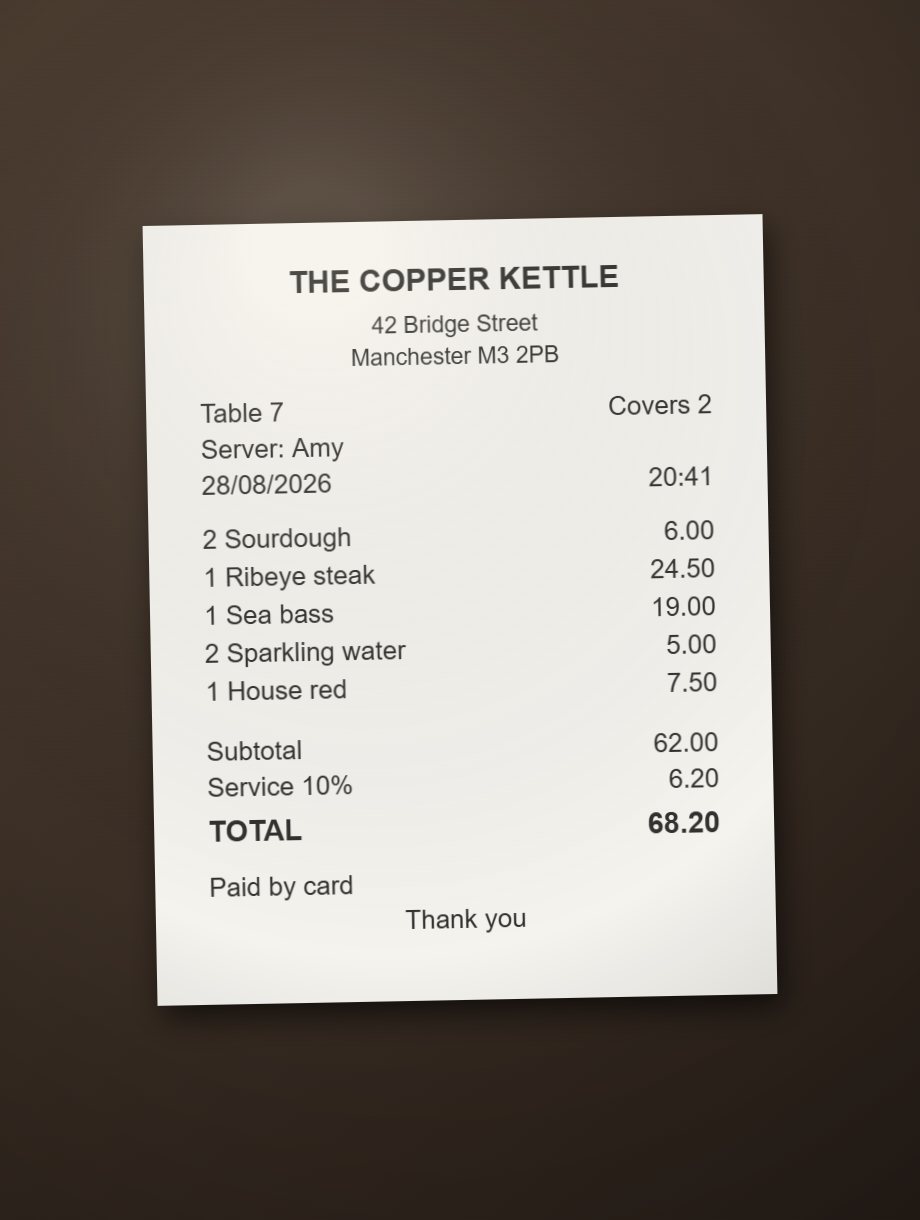
Not a clean scan — a restaurant bill snapped on a phone, on a dark table, slightly askew, lit from one side. That is what people actually upload. Here is the photo going in, and what the OCR read out of it:
THE COPPER KETTLE

42 Bridge Street

Manchester M3 2PB

Table 7 Covers 2

Server: Amy

| | |
| --- | --- |
| 28/08/2026 | 20:41 |
| 2 Sourdough | 6.00 |
| 1 Ribeye steak | 24.50 |
| 1 Sea bass | 19.00 |
| 2 Sparkling water | 5.00 |
| 1 House red | 7.50 |
| Subtotal | 62.00 |
| Service 10% | 6.20 |
| TOTAL | 68.20 |

Paid by card

Thank you
Every line came back correctly, prices included, off a photograph — and entirely in the browser, with the picture never leaving the machine. The items and their prices came back as a table: the prices sit in a column, so each item lands in a row beside its price, ready to paste into a chat. The shop's name and address stay as plain lines, and "Table 7" and "Covers 2" arrive as one line because nothing below lines up with them. Two honest quirks: the date and time sit in the table too, because they line up with the price column, and the header row is empty because a receipt has no column names to put there. Push the angle further, or let the photo blur, and accuracy drops; the fix is another photo, taken straighter.
Got a scanned PDF? This is the page for it
A scanned PDF is photographs in a PDF wrapper — there's no text layer inside, so the PDF converter finds nothing to extract. The fix: export the PDF's pages as PNG or JPG images (most PDF viewers can do this) and drop those images here. The OCR reads the pages the way it reads any other picture of text.
What OCR can and can't do
Printed text is the sweet spot. Screenshots, scans of typed documents, slides photographed straight-on — these read reliably. Pick the language of the text before converting: recognition uses a per-language model, and reading French or Japanese with the English one is what produces garbled accents and stray characters.
Handwriting is a lottery. Neat block capitals sometimes survive; cursive rarely does. Treat handwritten notes as a maybe, and proofread anything that matters.
Quality in, quality out. Blurry photos, low-contrast text, busy backgrounds and text photographed at an angle all cost accuracy. The built-in preprocessing compensates for a lot, but a straight, sharp, well-lit capture beats any amount of cleanup.
Tables need a column of numbers. A table in a screenshot or photo is rebuilt when at least one column holds numbers, prices, percentages or dates — statements, receipts, price lists, timetables. A grid made only of words, like a feature comparison, comes back as lines of text instead: from positions alone it can't be told apart from neatly laid-out prose, and a paragraph wrongly chopped into a table is worse than an honest list of lines. Columns are inferred from where the words sit, so check the figures in anything that matters.
Image conversion questions
Is this image to Markdown converter free?
▼
Yes — free, unlimited, no account. The OCR engine runs in your browser, so there's no per-image cost for us and no meter for you.
Is this the same as an image to text converter?
▼
Yes — extracting text from an image is exactly what it does. The output is plain, copyable text with light Markdown structure, so it works as a photo-to-text tool whether or not you care about Markdown: download the .md file or just copy the words.
Is my image uploaded to a server?
▼
No. Recognition runs on your own device. The only network traffic is your browser downloading the OCR engine and the recognition model for your chosen language the first time — the software comes to your image, your image never goes to the software.
Can it read text in languages other than English?
▼
Yes — 35 languages, including Portuguese, German, French, Spanish, ten Indian languages (Hindi, Tamil, Telugu, Bengali, Marathi, Gujarati, Kannada, Malayalam, Punjabi, Urdu), plus Arabic, Hebrew, Thai, Chinese and Japanese. Pick the language from the dropdown that appears when you stage an image; the choice is remembered for your next visit.
Can it read a screenshot for ChatGPT or Claude?
▼
Yes — that's the core use. A screenshot pasted into a chat is processed as an image at image prices; the same content as OCR'd Markdown is a few hundred tokens of plain text the AI can quote, search and reason over precisely.
Can it turn a screenshot of a table into a Markdown table?
▼
Yes, when the table has a column of numbers — prices, amounts, percentages or dates. The position of every word is used to rebuild the rows and columns, so a statement, receipt or price list comes back as a real Markdown table. A table made only of words comes back as lines of text instead, because from positions alone it can't be told apart from neatly laid-out prose.
Which image formats work?
▼
PNG, JPG, WEBP, GIF, BMP, TIFF and AVIF. SVG files are read from their text labels directly — no OCR needed.
Why did my image come back with 'no readable text'?
▼
The OCR found no words — usually because the image is a logo, icon or photo without text, or the text is too small or blurry to resolve. Try a sharper capture, or crop to just the text region.
Can it handle a photo of a whiteboard or a book page?
▼
Usually, if the shot is straight-on and in focus. Printed book pages read well; whiteboard marker is hit-and-miss depending on handwriting. The closer the photo is to a flat scan, the better the result.
PDF to Markdown
For PDFs with a real text layer — headings, paragraphs and tables reconstructed from the layout.
Convert a PDF →ZIP to Markdown
A folder of scans? Zip the images and every one is OCR'd into a single Markdown document.
Convert a ZIP →